- One More Way That Featured Press Releases Stand Out
- MyPR’s addition of a Table of Contents Boosts Your SEO, AI and GEO Goals
- ONLY Available to Featured Press Release Subscribers
- Does a Table of Contents help with SEO and AI Snippets
How Do AI Bots Decide to Cite Your Content?
The current thinking around being noticed and cited by AI Bots is to ensure that they know exactly what your article is about – a no brainer as traditional SEO also demands this.
But, we need to take that thinking up a notch or two by providing a bulleted ‘Table of Contents’ (ToC) or a bulleted ‘Too Long Didn’t Read’ (TLDR) Section within each article.
Here at MyPR we are rolling out such a service (to Featured Press Releases ONLY) that only needs to to take cogniscance of the underlying structure or method of how to do so. i.e. you only have to do ONE thing to enable the ToC’s for your press release.
Does a table of contents help with SEO and AI Snippets:
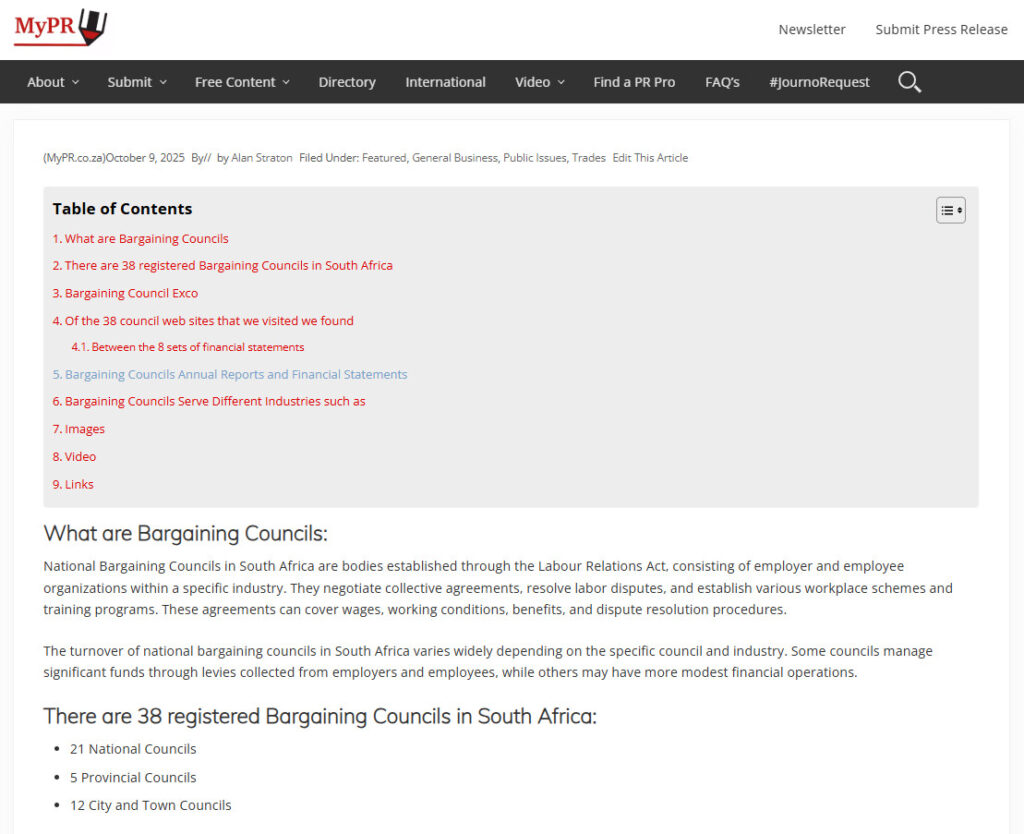
According to Google AI; “Yes, a table of contents (TOC) helps with SEO and AI snippets by improving user experience and providing clear structure, which can lead to better visibility in search results. By helping users quickly navigate content and allowing search engines to better understand page hierarchy, a TOC can result in increased click-through rates, higher rankings, and a greater chance of appearing in features like AI Overviews or featured snippets.” See also screenshot below.
How Does MyPR Accomplish This?
Simply put, through use of Heading Tags (H1, H2, H3, H4, H5, H6).
Your heading tags are a signal to indexing bots (Search Engines, AI etc.) of the decreasing importance of each heading – with H1 being most important and biggest and then cascading down to H6).
As an example – in this article you are reading we encapsulated each heading in Heading tags – H3 is just the right size and bold to trigger the Table of Contents you see above.
The ToC will only be triggered for more than three H tags.
All you need to do to trigger the Table of Contents is to use ONE Header Tag as there are already three H3 headings in each article – Images, Video and Links.
Can I Cascade my Table of Contents?
The short answer is Yes – see below for the importance and above for what happens when you ‘cascade’ your titles.
Header One: An example of cascading tags
The title above is an H1 tag.
Header Two:
The title above is an H2 tag.
Header Three:
The title above is an H3 tag.
Header Four:
The title above is an H4 tag.
Header Five:
The title above is an H5 tag.
Header Six:
The title above is an H6 tag.
How do I ‘choose’ a Header Tag?
If you are using the Rich Text Editor then highlight the title you want as a heading, click on the ‘Paragraph’ setting in the top left corner of the editor and select your Header – Please do not select ALL H1 tags. If your selected titles would normally be BOLD only then please select H3 as the Heading title tag.
If you are using the code editor then I shouldn’t have to explain how at all and you could probably give us all a lesson.
Where will the Table of Contents appear?
At the top of every article submitted from your Featured Press Release submission page.
What Can You Expect?
Suffice to say – a higher probability of being cited in an AI Snippet and appearing on the first index pages of the various search engines.
REMEMBER: The possibility of being cited also heavily depends on the title keywords, subject matter and relevance to the paragraph immediately following your title. In other words don’t use a title that says; “Why MyPR Has Got Your Back” and then talk about the crazy foods you just ate in Outer Mongolia!
How Do You Start Using the ToC?
Just use Heading Tags (H3) where you would have bolded your press releases and make sure that you use at least one title to trigger it (We have three already in place in every release – Images, Video, Links).
I Don’t want to use the Table of Contents
Then simply OMMIT using any Heading Tags in your featured press release.
Can I Close the Table of Contents?
Yes, – click on the menu button to the right of the Table of Contents title. Click again to open.
What Plugin Did MyPR Use?
There are a number of WordPress Plugins available to accomplish a Table of Contents.
We wanted a plugin that was ‘popular’ and used a shortcode.
Easy Table of Contents accomplished this relatively seamlessly for us.
Visit Easy Table of Contents: https://tocwp.com/
In the video below, Stewart Gauld shows you two other methods you could use to install a Table of Contents on your WordPress site.
Gauld emphasises that a Table of Contents section does the following:
- Enhances user navigation
- Improves SEO
- Structures Content
Images:

Video:
Heading Tags
Links:
Boilerplate and Editor’s Notes.
More Info on Heading Tags here:
X: https://twitter.com/MyPE
LinkedIn: https://www.linkedin.com/in/alanstraton/
Facebook: https://www.facebook.com/StratonElectrical/
CLICK HERE to submit your press release to MyPR.co.za.
My Press Release (MyPR) provides free South African targeted content and press releases for on and off line publishers and media.
Registering on MyPR enables public relations companies and practitioners to post articles under their own author name.
Public Relations Companies and practitioners, event organisers, sports and political writers use MyPR as a distribution mechanism for their press releases, content, images and news.
A forever free subscription allows publishers and media free access to all press releases, content and images on MyPR.